AppShot AI— AI-powered App Store Play Store Screenshot Generator (SaaS Self-Hosted)
| Quantity | Discount |
| 2 - 4 | 2% |
| 5 - 9 | 5% |
| 10 - 15 | 7% |
| 16 + | 10% |
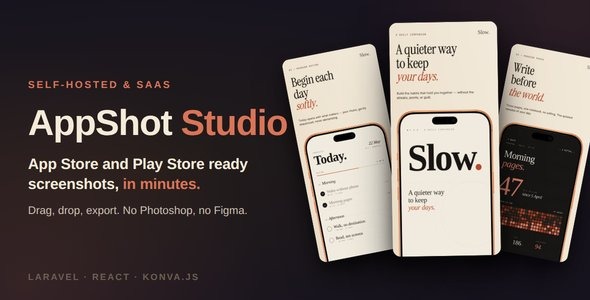
AppShot Studio is a complete App Store and Google Play screenshot generator built with Laravel and React. Design a single canvas in a fast, visual editor and export pixel-perfect screenshots for iPhone, iPad, Android phone and tablet – portrait and landscape – plus the Play Store feature graphic, in as many languages as you need (left-to-right and right-to-left), organized into a clean ZIP ready to upload.It ships in two modes from a single codebase: a multi-tenant SaaS (with Stripe, Razorpay and PayPal billing, plans, and a full admin dashboard) and a single-tenant self-hosted install that runs on shared hosting with zero SSH access. No Node.js, Redis, or headless browser required on the server – a guided web installer does the rest.KEY HIGHLIGHTSVisual editor – drag, drop, type, and export.Every device size – design once; each device variant is authored with smart anchors.Photoreal device frames – drop your screenshot into crisp iPhone, iPad, Pixel, Galaxy and Tab frames.Project template kits – start from a finished, multi-screen design and ship in minutes.Multi-language & RTL – localize screenshots per language, including right-to-left scripts.One-click ZIP export – exact store pixel dimensions, organized per device and language, generated in-browser.SaaS billing built in – Stripe, Razorpay & PayPal, multi-currency, plans, proration, refunds, tax.Full admin dashboard – users, tenants, subscriptions, invoices, plans, audit log, and more.Marketing CMS SEO – admin-editable landing, pricing, and legal pages with per-page SEO.Switchable storage – Local, Amazon S3, DigitalOcean Spaces, Wasabi or Minio.Dual mode – hosted SaaS or self-hosted, same features, one codebase.Screenshot editorFast canvas workspace with pan, zoom, and gridPatch-based undo / redoSix layer types: text, background, shape, image, device frame, and callout, plus layer groupsCapability-driven properties panel — only the controls relevant to the selected layerInline text editing — click to retype, drag to moveSnap-to-align guides for tidy layouts without a design backgroundText fit modes: auto-fit, fixed, and min/max font sizeShape system with gradient presets, multi-shadow stacking, blend modes, and a freehand pen-path toolImage-masked-by-shape clippingImage color overlay (tint) and alpha-aware drop shadow that follows both transparency and rounded cornersPhotoshop-style crop overlay with 8 handlesDrag images straight from your desktop onto the canvasCross-screen copy / paste that preserves alignmentToast notifications with live upload progressUp to 10 screenshots per project (App Store Connect ceiling)Light and dark editor themeDevice framesPhotorealistic frames for iPhone 17 Pro Max, iPad Pro 13” (M5), Pixel 10 Pro, Galaxy S26, and Galaxy Tab S8 Ultra – multiple colors eachProcedural-bezel fallback for any deviceReal-frame tilt up to ±15° per axis, with automatic downgrade to procedural beyond the capDrop a raw screenshot into a frame and reposition / fit it inside the screen areaMulti-device10 form factors: iPhone, iPad, Android phone, and Android tablet — each in portrait and landscape — plus the Play Store feature graphic (1024×500 marketing banner)Design every factor explicitly, or stamp from one factor to the rest in a single actionPer-property linking — shared content and styling stay in sync across factors via a shared layer idFrame device family linking — pick an iPhone frame and the iPad / Android factors swap to matching devicesPercent-based anchors and safe-area insets so layouts hold up across sizesLocalization & RTLAuthor screenshots in multiple languages per project, with a default-language fallbackPer-language text overrides — translate captions without rebuilding the layoutPer-language screenshots — swap the image inside a device frame for each localeFull right-to-left (RTL) support for Arabic, Hebrew, Persian, and Urdu, with direction-aware canvas renderingAutomatic RTL mirroring, with a per-layer override to veto it where you don’t want itLanguage-aware font stacks (Latin, CJK, Arabic, Hebrew, Devanagari, and more)Export organized per language — pick which locales to include in the ZIPLanguage picker in the editor and at project creationExportClient-side ZIP export via the browser — no server render queue, no waitingExports at the exact pixel dimensions Apple and Google require for each device tierClean folder structure per device, language, and form factorOptional compression toggle — typically about 70% smaller with no visible quality lossDirect browser downloadProject templates (kits)Pre-designed, multi-screen kits — pick one, swap your content and brand, and shipEach kit scaffolds every screen across the device sizes you chooseAuthor your own kits in the editor and export them as installable ZIPsAdmin kit management: upload, feature, mark premium, edit metadata, deletePremium kits can be gated to paid plans (SaaS mode)SaaS billing (SaaS mode)Three payment providers built in: Stripe, Razorpay, and PayPalMulti-currency pricing — the same plan can show different amounts per provider / regionPlans with feature limits (project count, export, premium kits, storage quota)Plan upgrades / downgrades with proration, monthly to yearly switchingRefunds (full and partial) from the admin panelProvider-managed tax (Stripe Tax / Razorpay GST / PayPal)Pricing page doubles as the change-plan surfaceEncrypted credential storage; webhook handling with idempotency and replayAdmin dashboard (SaaS mode)Dashboard — MRR, active subscriptions, users, projects, signups sparkline, and a guided onboarding checklistUsers — search, filters, detail view, edit, impersonationTenants — list and drill-inSubscriptions — filters, timeline, cancel / resume / change-plan, test-data toolsInvoices — list, filters, refund modalWebhook events — masked-payload viewer and replayPlans & providers — create / edit / delete plans, wire per-provider pricesSettings — SMTP, branding, signup policy, kit-author allowlist, and more, with a send-test-email toolAudit log — every state-changing admin action recordedMaintenance — run scheduled cleanup sweeps on demand